
The IDE for Video Engineers
Inspect, transcode, package, validate, and measure quality with VMAF in one desktop app instead of a dozen terminal windows.
Built by an engineer who spent 10 years shipping streaming at NBCUniversal and Sky UK.
Built on FFmpeg. Runs entirely on your machine, with no account required·Featured on Product Hunt
Everything in one place
Seven integrated tools that cover the full professional video workflow, from first inspection to final delivery.
See inside any file.
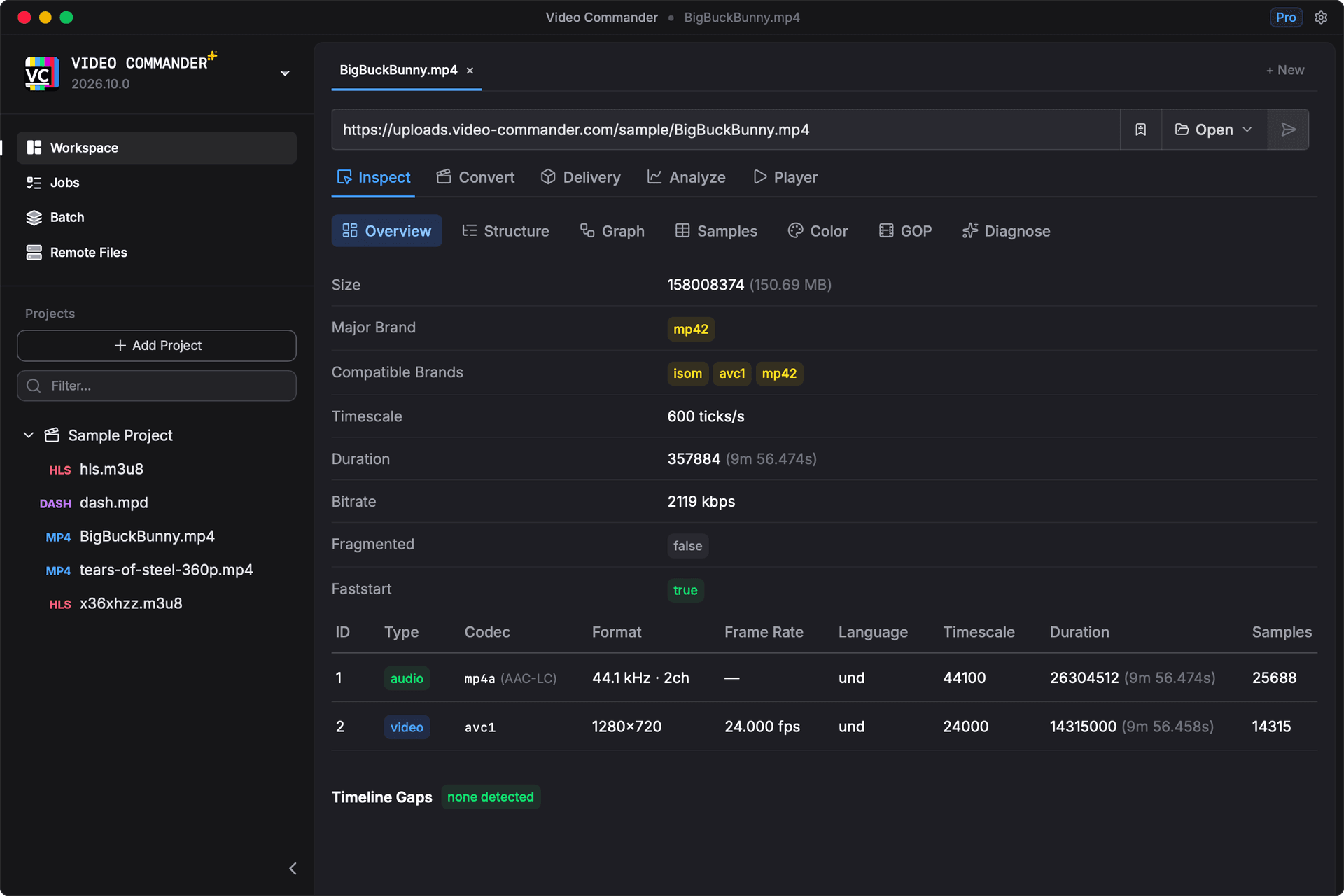
Open a local file, a URL, or an object in S3 and the container comes apart: tracks, codecs, box hierarchy, and frame-level sample tables. Remote sources are read over HTTP range requests, so you pull only the bytes the parser needs.
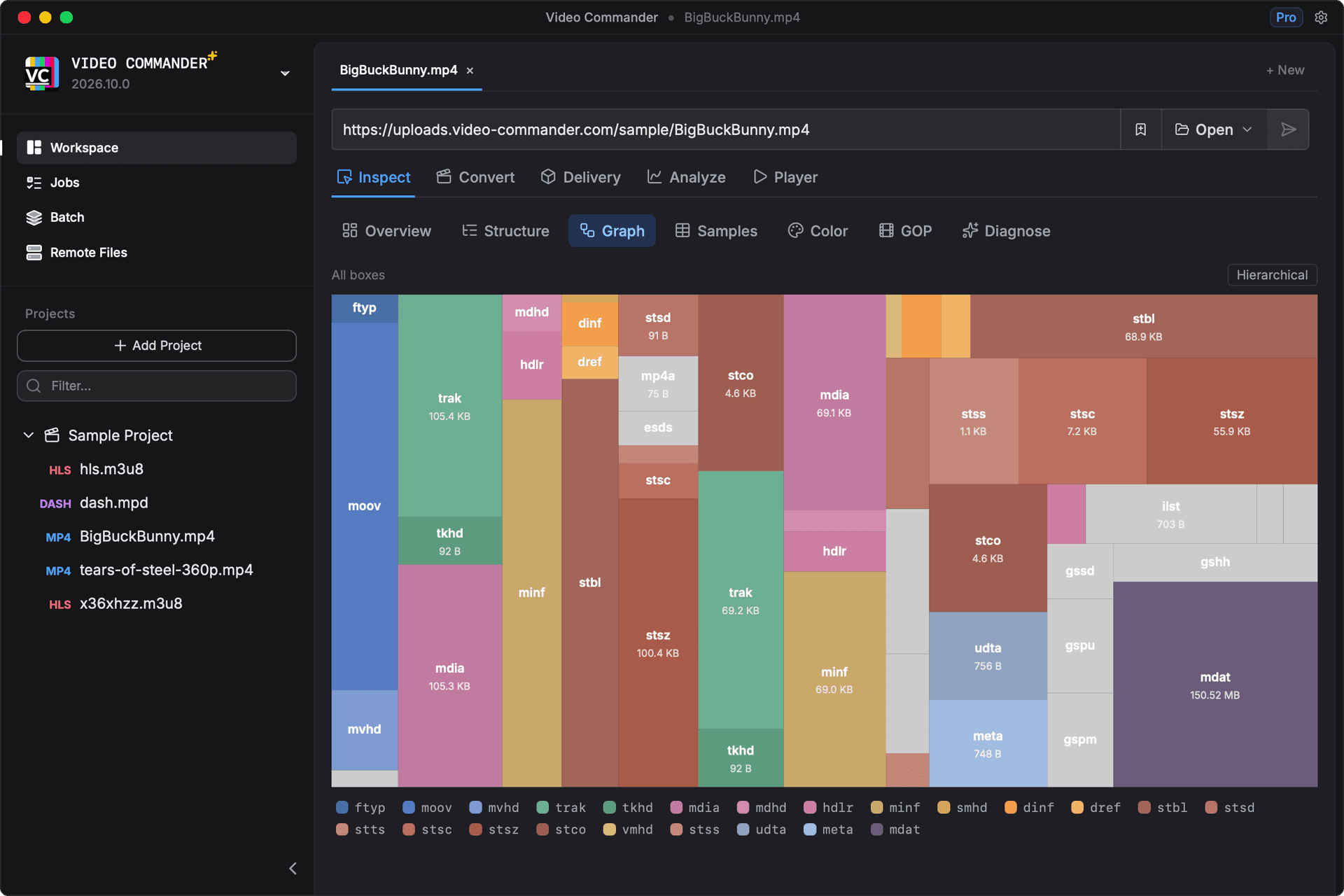
The tabs follow the file. Media info, the box tree with a raw hex dump, a size graph, and sample tables on every MP4, with colour and HDR, GOP structure, subtitles and captions, ad markers, and DRM appearing when the file carries them.
Quality, quantified.
Run VMAF against your source and encode and the Summary reports the whole encode: mean, harmonic mean, percentiles, and the lowest-scoring moments. Netflix's VMAF v1 models are the default, and HDR sources are tone mapped so they can be scored against SDR encodes.
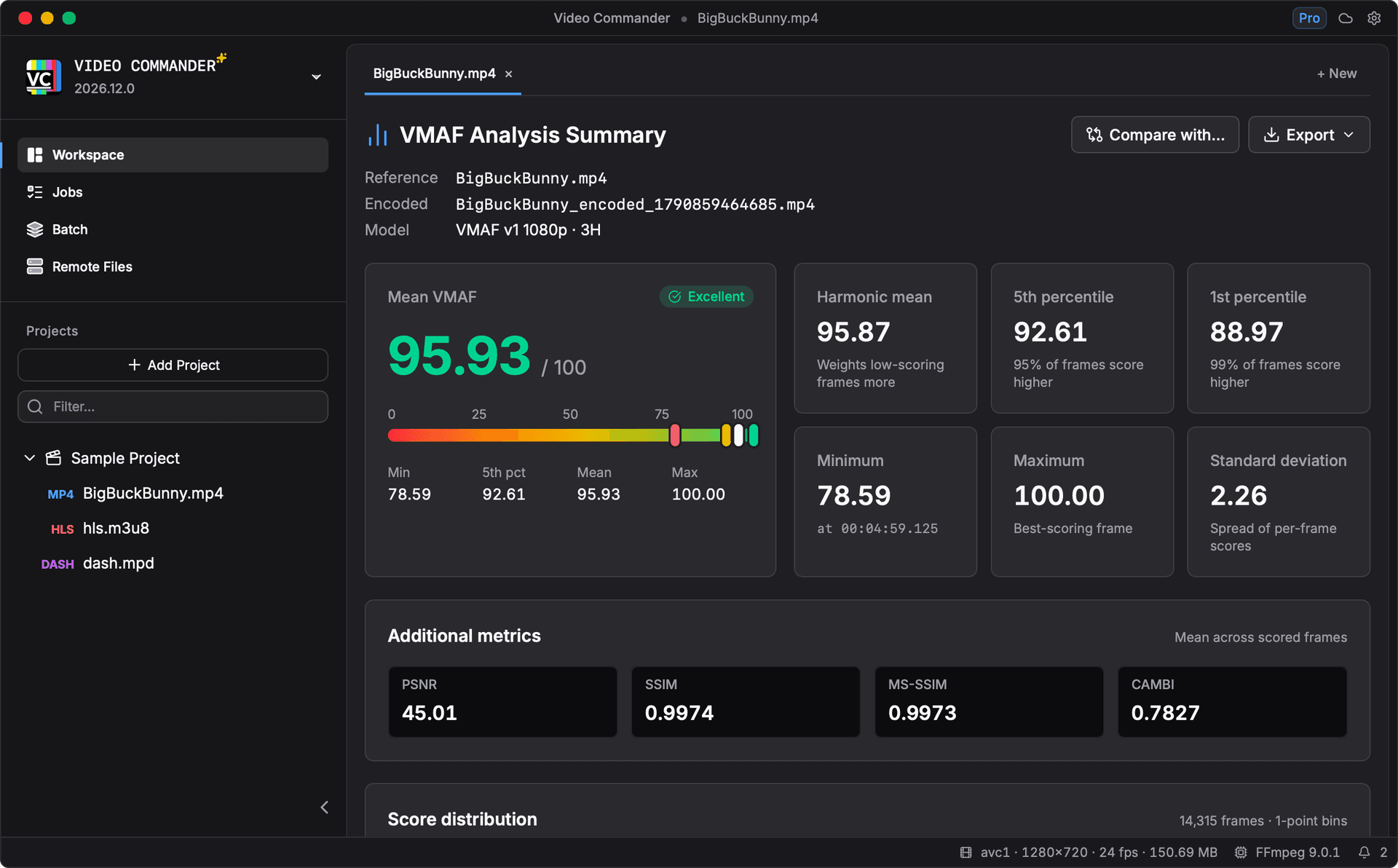
Compare runs side by side. The Compare tab puts up to three analyses next to a baseline, with each one's change in score, bitrate, and size. The Frames tab puts any frame up against its source with a wipe, a difference map, and an A/B blink. The Summary saves as PNG or PDF.
Every signal, decoded.
Four tabs read what the container only hints at: how a file signals colour and HDR, which subtitle and caption tracks it carries, where its ad markers fall, and how its tracks are encrypted.
Color & HDR
CICP primaries, transfer, and matrix. Classifies HDR10+ and Dolby Vision, with MaxCLL, MaxFALL, and mastering display metadata.
Subtitles & Captions
Decoded tx3g, WebVTT, and TTML/IMSC cues with timing and language, plus CEA-608/708 riding inside the video bitstream.
Events
SCTE-35 decoded from emsg boxes: splice points, break durations, event IDs, and segmentation descriptors.
DRM
Per-track encryption scheme and version, clear tracks separated from encrypted, and pssh boxes decoded to their DRM systems.
They appear when the file carries them. A file with no ad markers has no Events tab, so the tab strip tells you what is in the file before you read a single value.
Transcode with precision
A clean FFmpeg front-end that lets you configure supported parameters without memorising command-line flags.
- Software and hardware encoders: VideoToolbox, NVENC, AMF, QSV
- AV1 with SVT-AV1, in MP4, MKV, and WebM
- Target VMAF mode: automatically finds the lowest-bitrate CRF that meets your quality score
- Video filter pipeline: deinterlace, denoise, sharpen, color, crop, and more
- Batch encoding: queue multiple files with shared settings
- Check before you commit: a 30 second test encode and a live FFmpeg command preview
- Read sources from and write encodes back to Amazon S3, Cloudflare R2 & MinIO
Package for any platform
Go from a master file to delivery-ready packages in one step, with the output options broadcasters and streaming platforms expect.
- HLS, DASH, and combined HLS+DASH packaging
- Multi-rendition ladder configuration
- AES content encryption
- Segment duration and playlist controls
- CDN-ready output folder structure
Play and review with detailed insights
Play local files or remote streams with detailed playback statistics. Opens automatically when a preview or full encode completes.
- Supports MP4, WebM, MOV, MKV, and more
- HLS and DASH adaptive streaming playback
- Works with local files and any http(s):// URL
- Auto-opens after a preview or full encode job completes
- Detailed playback statistics and insights
Fail here, not in production.
Malformed manifests and missing segments are the bugs that reach viewers first. Video Commander checks HLS and DASH against the spec and probes every segment URL, so packaging problems surface at your desk instead of in a support ticket.
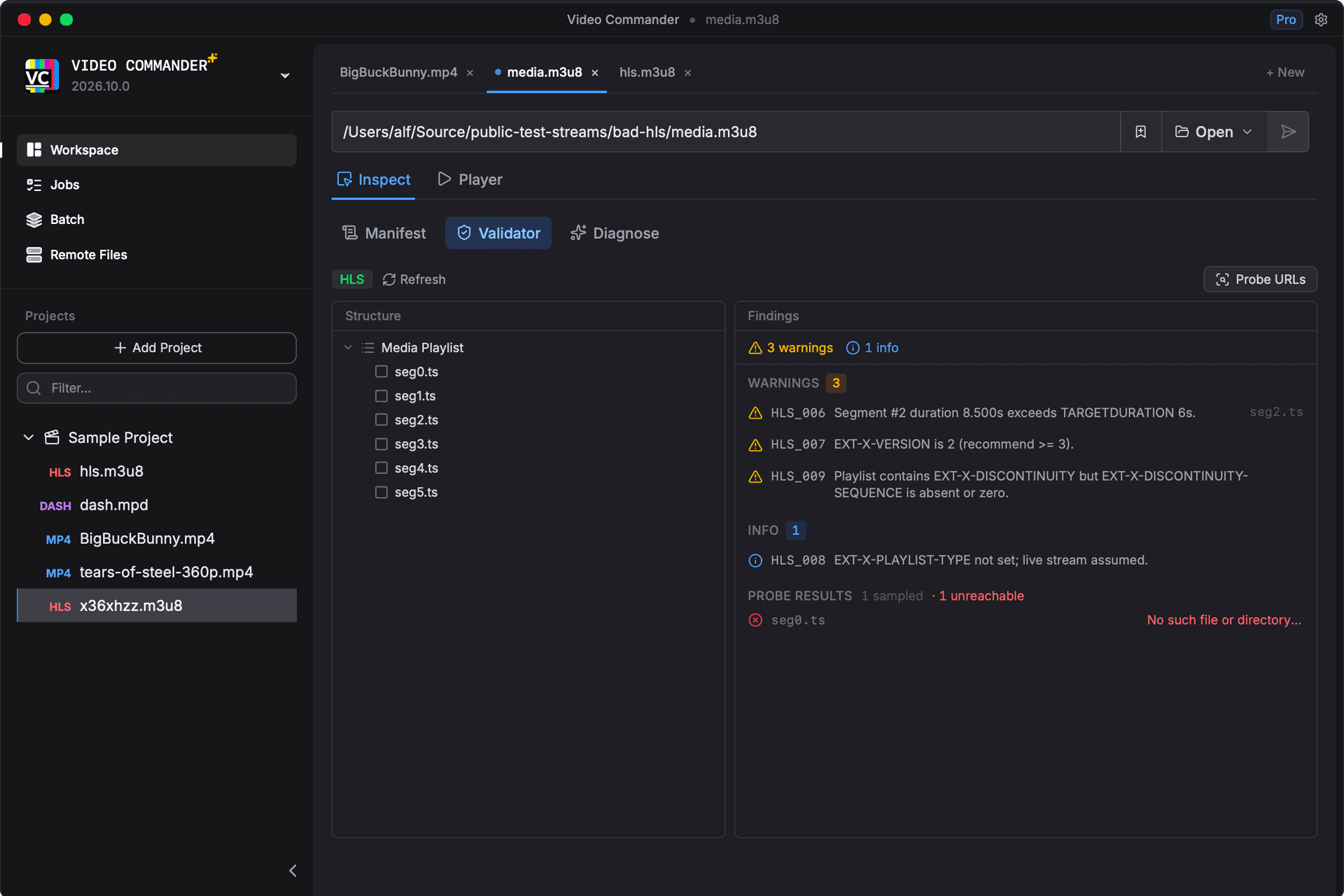
Every finding, ranked. Errors, warnings, and info separated per rendition, each one carrying a rule ID and the value that broke it.
From the Blog
View all posts →October 1, 2026
October 2026 (version 2026.12.0)
Score HDR video against its SDR version, compare analyses side by side, Netflix’s newer VMAF models, faster scoring, a complete quality report, much faster AV1 encoding, a native menu bar, and 10-bit HEVC on Mac.
September 4, 2026
September 2026 (version 2026.11.0)
Job notifications and a history, a command palette, a status bar, a run toolbar on the encode views, thirteen themes including light mode, frame comparison for VMAF runs, trick-play thumbnail validation, and a vc command-line companion.
August 1, 2026
August 2026 (version 2026.10.0)
Color and HDR classification, subtitle and caption decoding, SCTE-35 events, DRM inspection with a standalone PSSH decoder, custom Convert presets, a choosable FFmpeg build, and Inspect running in the browser.
“It works great, super impressive! This would have been a huge help troubleshooting packager issues. Wish I'd had it sooner.”

Tom S.

Hey, I’m Alfred 👋
I’m a software engineer and video specialist based in Tokyo. I’ve spent the last decade building streaming video platforms at places like NBCUniversal and Sky UK, delivering media to millions of users. Video Commander grew out of the tools I kept wishing I had during that work: a single place to inspect, convert, validate, and analyze media without stitching together a dozen CLI commands.
Before you download.
- Can I try it before installing anything?
- Yes. The playground runs the real Inspect module in your browser, compiled to WebAssembly, so you can drop in an MP4 and read its structure without downloading the app. Nothing is uploaded. It needs a screen at least 1024px wide, since it is the desktop interface.
- Do I need to install FFmpeg separately?
- No. If FFmpeg is already on your PATH, Video Commander finds and uses it. If not, the first view that needs it, such as Convert, offers to download a verified build for you. Settings lets you switch between your system copy, the app-managed build, and a custom path at any time. Inspection never needs FFmpeg at all.
- Is Pro a subscription?
- No. Video Commander is free for personal use, and Pro is a one-time $39 for client and commercial work. Every future update is included, and there is nothing recurring.
- What can it open?
- MP4 and the wider ISOBMFF family in the most depth, plus MKV and AVI, and HLS and DASH manifests. Sources can be local files, http(s) URLs, or objects in Amazon S3, Cloudflare R2, and MinIO.
- Does my media leave my machine?
- No. Video Commander is a desktop app and everything runs locally, with no account and no upload step. Remote sources are read directly from the URL or bucket you point it at, over HTTP range requests.
Stop stitching together CLI tools.
Video Commander is free for personal use. For client and commercial work, Pro is $39. One payment, every future update included.